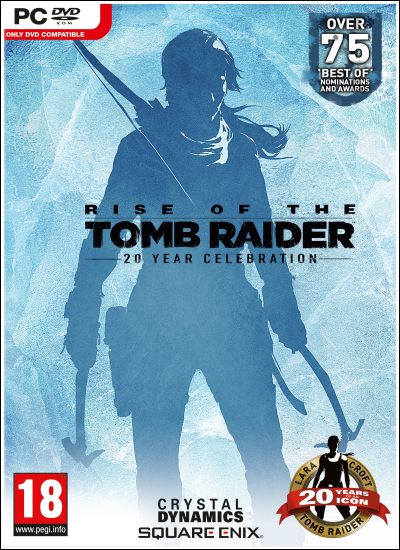
Year of release : 9 February 2016 (v1.0.1026.0 – 23 November 2021)
Genre: Action, Adventure
Developer: Crystal Dynamics, Eidos-Montreal, Nixxes
Publisher : Square Enix
Platform : PC
Publication type : RePack
Interface language : Russian / English / MULTi15
Voice language: Russian / English / MULTi13
Game version : v1.0.1026.0 – No Denuvo – 11/23/2021
Tablet: Present (PLAZA / CODEX)
SYSTEM REQUIREMENTS:
Minimum system requirements:
– Requires 64-bit processor and operating system
– OS: Windows 7
– Processor: Intel Core i3-2100 or AMD equivalen
– RAM: 6 GB of RAM
– Video card: NVIDIA GTX 650 2GB or AMD HD7770 2GB, DirectX 11
– Disk space: 36 GB
GAME DESCRIPTION:
Rise of the Tomb Raider: 20 Year Celebration includes the base game and Season Pass featuring all-new content. Explore Croft Manor in the new “Blood Ties” story, then defend it against a zombie invasion in “Lara’s Nightmare”. Survive extreme conditions with a friend in the new online Co-Op Endurance mode, and brave the new “Extreme Survivor” difficulty. Also features an outfit and weapon inspired by Tomb Raider III, and 5 classic Lara skins. Existing DLC will challenge you to explore a new tomb that houses an ancient terror in Baba Yaga: The Temple of the Witch, and combat waves of infected predators in Cold Darkness Awakened.
How to install
1- Run the installer as administrator
2- Click on the page
3- Press the up arrow on your keyboard
4- Click Install
5- Click Continue
6- Select installation destination
7- Click Next
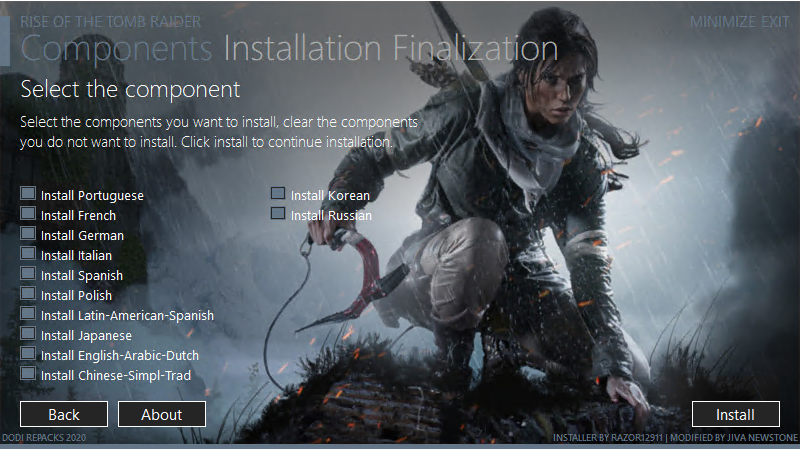
8- Select component
9- Install
Repack Features
Based on
– Rise.of.the.Tomb.Raider.20.Year.Celebration.v1.0.1026.0-PLAZA
– Rise.of.the.Tomb.Raider.20.Year.Celebration.v1.0.1026.0.Language.Pack-PLAZA
– Missing Arabic files added, Thanks to AR-81
Game Version v1.0.1026.0 – No Denuvo – 23.11.2021
DLCs
Rise of the Tomb Raider – Sparrowhawk Pack
Rise of the Tomb Raider – Hopes Bastion Pack
Rise of the Tomb Raider – Tactical Survivor Pack
Rise of the Tomb Raider – Apex Predator Pack
Rise of the Tomb Raider – Wilderness Survivor
Rise of the Tomb Raider – Siberian Ranger
Rise of the Tomb Raider – Ancient Vanguard
Rise of the Tomb Raider – Prophets Legacy
Rise of the Tomb Raider – Endurance (Endurance Mode)
Rise of the Tomb Raider – Baba Yaga: The Temple of the Witch
Rise of the Tomb Raider – Cold Darkness Awakened
Rise of the Tomb Raider – Remnant Resistance Pack
Rise of the Tomb Raider – 20 Year Celebration Pack
Rise of the Tomb Raider – Season Pass
Rise of the Tomb Raider – Valiant Explorer
Language :
– Interface language: MULTi15
– Audio: MULTi13
– Language can be changed in game settings
Selective Download Feature : you can skip downloading and installing language packs you don’t need
Repack Size : from 12.9 GB
Final Size : 36 GB
Lossless repack , Nothing removed OR re-encoded
Install Time : 4 – 10 mins { Based on Your PC and selected items }
Credits : Razor12911 for XTool library
Greetings : ElAmigos, KaOsKrew, FitGirl, Masquerade
Repack By DODI
PLZ SEED , DONT HIT & RUN
Selective Download
you can skip downloading and installing language packs you don’t need
– Chinese-Simpl-Trad.doi (include both Taditional and Simplified Chinese)
– English-Arabic-Dutch.doi (include English, Arabic and Dutch languages)
– French.doi
– German.doi
– Italian.doi
– Japanese.doi
– Korean.doi
– Latin-American-Spanish.doi
– Polish.doi
– Portuguese.doi
– Russian.doi
– Spanish.doi (Spain)
Download Links
Torrent – Click Here – or – Click Here
krakenfiles – Click Here
UploadEV – Click Here
OneDrive – Click Here
Please Consider Donate if possible
how to change the language to english, all the text is in arabic and i installed english.doi only
In your desktop, right click RoTR icon and hit properties; open file location; open file named CPY and make sure this is present – Language=en; save the changes and fire away.
Also this one says unable to load bigfile001
Game works fine 5/25/19 and Installed under 25 minutes. Best UI Repack installer i have seen to date although some people might find the auto browser launching and the end of the installation somewhat dubious.
Minor error upon launching the game through desktop icon if installed on a custom directory (it seems).
Shortcut shows “abc:yourgamedirectorybin” in “Start in” field. Should be replaced to where you custom installed your game.
And as below, the Ini might need to be manually changed as its default is set to arabic.
Thank you for this quality repack.
thx for real feedback
Sure, but our thanks, your work warrants a feedback
Hi dear may I ask you to repack rise of the tomb raider final version with delta -t crack?
no new content to re-repack
The file-org link for the torrent isn’t working.please help.
Google drive link not working too.please help sir
give me few mins
Sniper
???????????????
DODI, the google drive link isn’t working, please fix it :3
cheers 🙂
use mirrors , it is faster and better
not for me :/ i usually download very fast using gdrive. Using your direct download links take ages :/
Gdrive links fixed , works well now
When I launch the game show a message “error out of table range” Failed to open BIGFILE.000
use exe in game folder